Files
micromelon-website/content/resources/build-guide-roborave-line-follow.mdx
Tim Hadwen 707c49dd3f Build Your Kit page and full Micromelon website
Complete website build including:
- Build Your Kit store page with cart system, sectioned layout
  (Hardware, Software, Attachments, Spare Parts), inline quote
  request form, and sticky sidebar summary
- 16+ pages: Education, Platform, Resources, News, About Us,
  Download, Contact, Rover, Code Editor, Robot Simulator, etc.
- 89+ MDX resource articles and 18 news posts
- Store product images scraped from micromelon.com.au
- Quote request API route with Airtable integration
- Dynamic back links and cover photos on resource pages
- Redesigned downloads page
- Fixed corrupted MDX code blocks
2026-02-28 19:00:42 +10:00

111 lines
4.4 KiB
Plaintext
Raw Blame History

This file contains ambiguous Unicode characters
This file contains Unicode characters that might be confused with other characters. If you think that this is intentional, you can safely ignore this warning. Use the Escape button to reveal them.
---
title: "Build Guide: RoboRAVE Line Follow"
date: "2024-12-31"
categories: ["Build Guides"]
tags: ["Build Guide", "3D Printing", "Line Follow"]
excerpt: "What Youll Need: Click on the buttons below to collect the print files! Printables Thingiverse Makerworld"
featuredImage: "/images/resources/build-guide-roborave-line-follow.jpg"
---
![](https://images.squarespace-cdn.com/content/v1/60a43bf842d7b601064a8828/06b1edb8-569b-4a74-b843-70fcbd709345/IMG_1131.jpg)
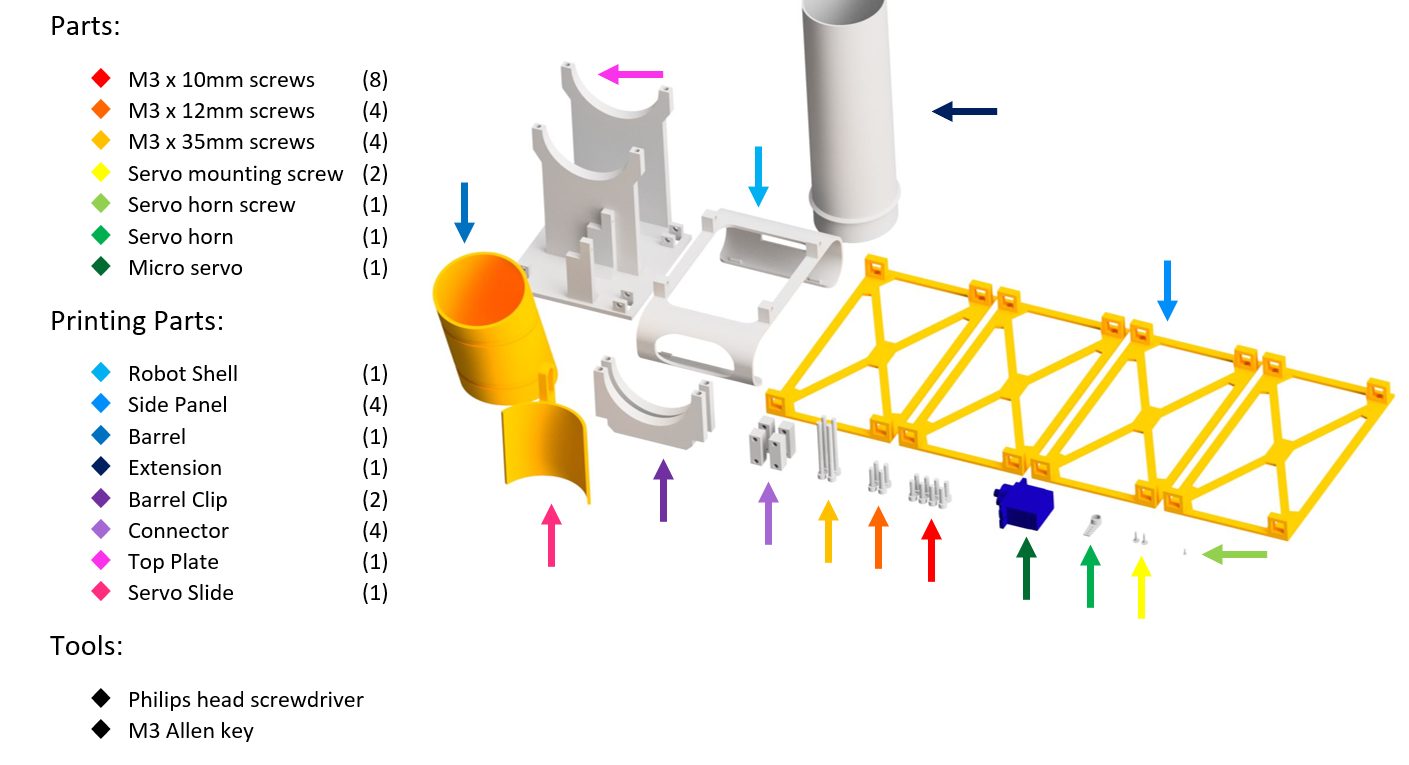
## What Youll Need:
![](https://images.squarespace-cdn.com/content/v1/60a43bf842d7b601064a8828/11b8addc-b96a-4d25-a417-ee41cf226110/Parts.PNG)
Click on the buttons below to collect the print files!
[
Printables
](https://www.printables.com/model/639386-micromelon-roborave-line-follow-attachment)
[
Thingiverse
](https://www.thingiverse.com/thing:6284165)
[
Makerworld
](https://makerworld.com/en/models/147778)
![](https://images.squarespace-cdn.com/content/v1/60a43bf842d7b601064a8828/92405d2b-7ba2-4907-ab74-671e95e93483/Spacer.png)
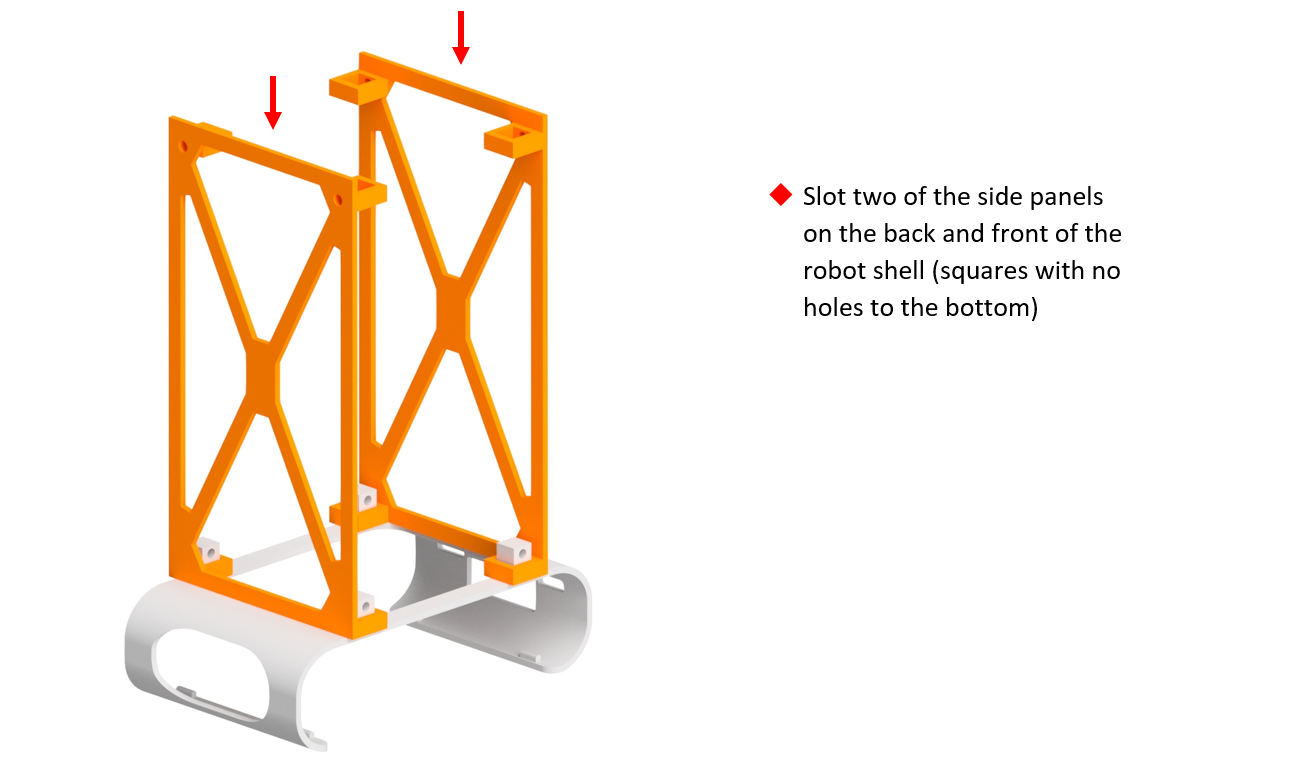
## Step 1:
![](https://images.squarespace-cdn.com/content/v1/60a43bf842d7b601064a8828/683562cf-bfa9-44cb-91d9-3fa4b7a2b863/Step+1.PNG)
![](https://images.squarespace-cdn.com/content/v1/60a43bf842d7b601064a8828/6e89d704-2860-470f-a944-c31d76d79d3a/Spacer.png)
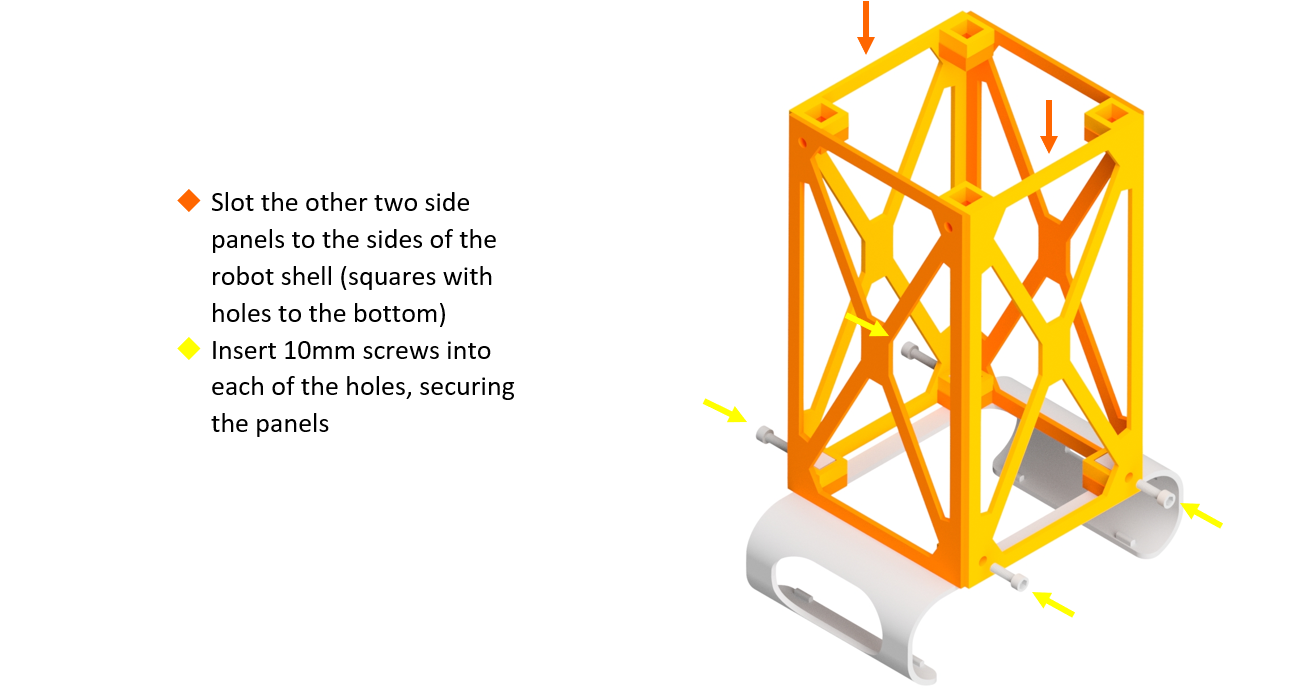
## Step 2:
![](https://images.squarespace-cdn.com/content/v1/60a43bf842d7b601064a8828/e83628b4-fbe8-458f-a9f7-28c5f693adbf/Step+2.PNG)
![](https://images.squarespace-cdn.com/content/v1/60a43bf842d7b601064a8828/1270518c-ade1-4d7b-a504-545d2c23238e/Spacer.png)
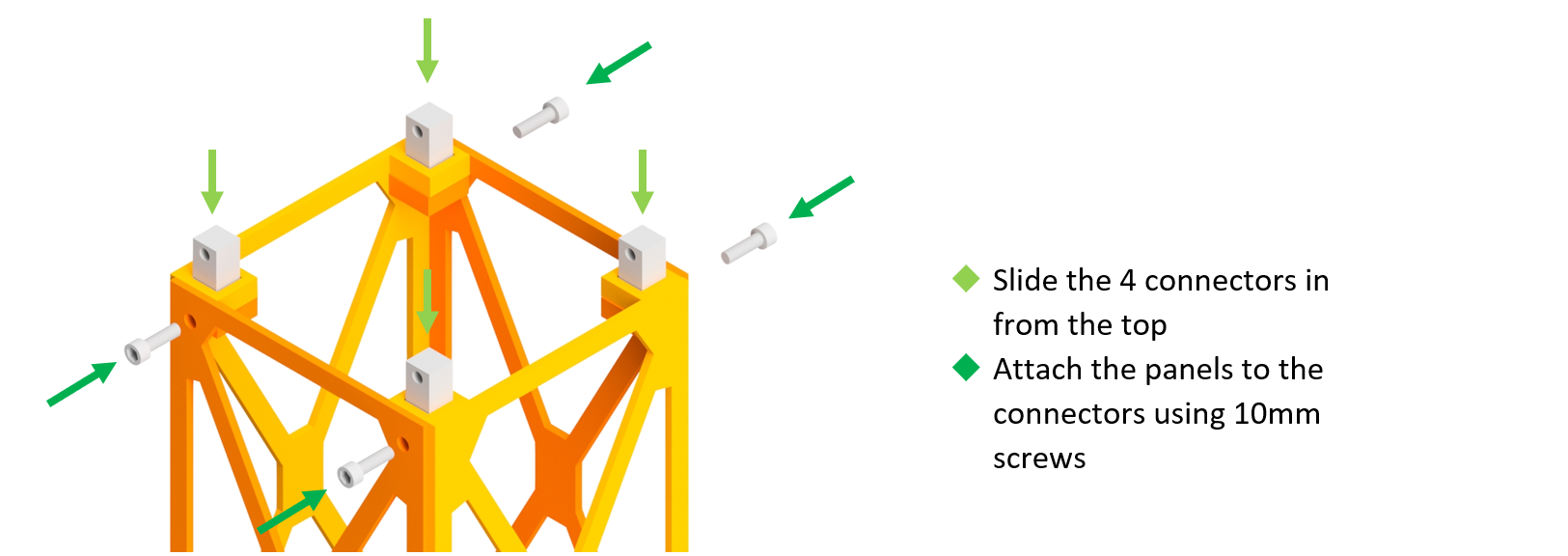
## Step 3:
![](https://images.squarespace-cdn.com/content/v1/60a43bf842d7b601064a8828/f71d9a33-f9cc-4435-9c99-2cb9fd6f708b/Step+3.PNG)
![](https://images.squarespace-cdn.com/content/v1/60a43bf842d7b601064a8828/56045e9d-987e-4193-a016-439429419639/Spacer.png)
## Step 4:
![](https://images.squarespace-cdn.com/content/v1/60a43bf842d7b601064a8828/f7e57c6d-7a2f-4f31-988f-b971232a2aee/Step+4.PNG)
![](https://images.squarespace-cdn.com/content/v1/60a43bf842d7b601064a8828/ae5ddb8f-202e-431a-809c-f299897df0d3/Spacer.png)
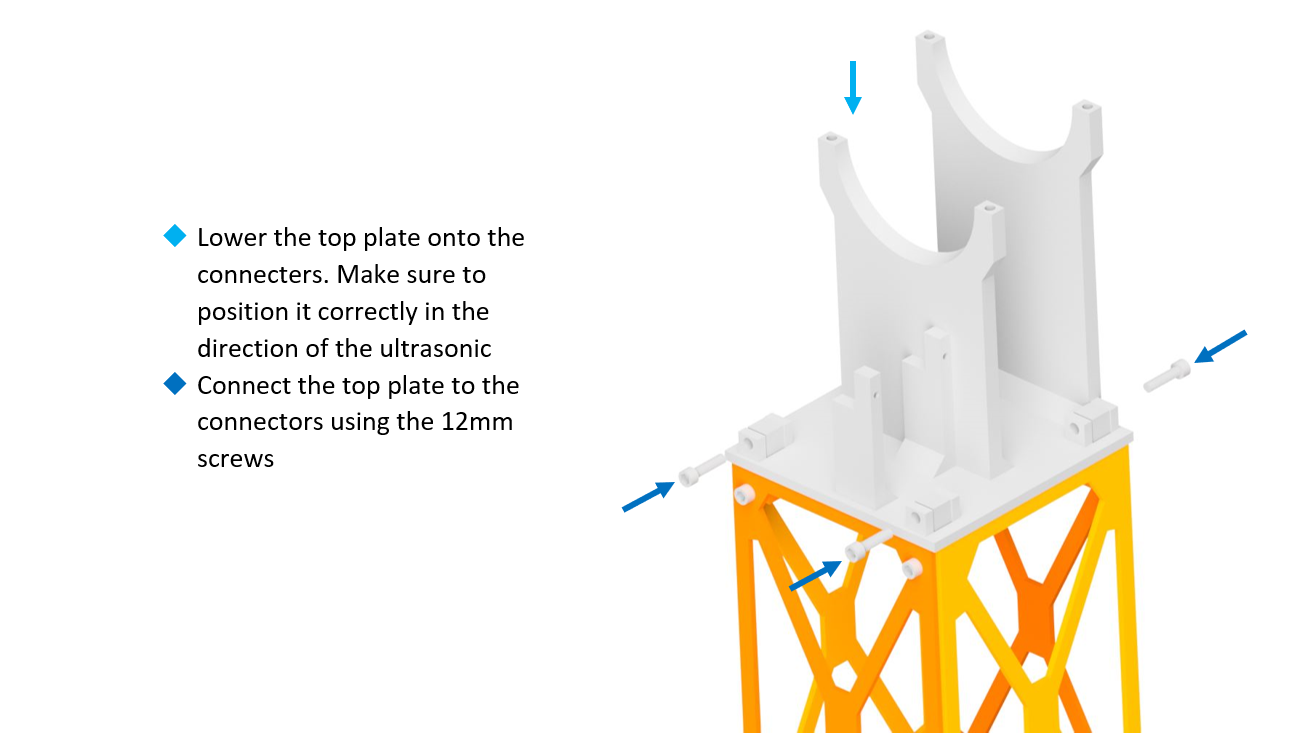
## Step 5:
![](https://images.squarespace-cdn.com/content/v1/60a43bf842d7b601064a8828/bc9c7646-496e-4a21-bcc6-f48dc1eeec97/Step+5.PNG)
![](https://images.squarespace-cdn.com/content/v1/60a43bf842d7b601064a8828/0082261a-2e3d-4823-9ad6-590481eb6f44/Spacer.png)
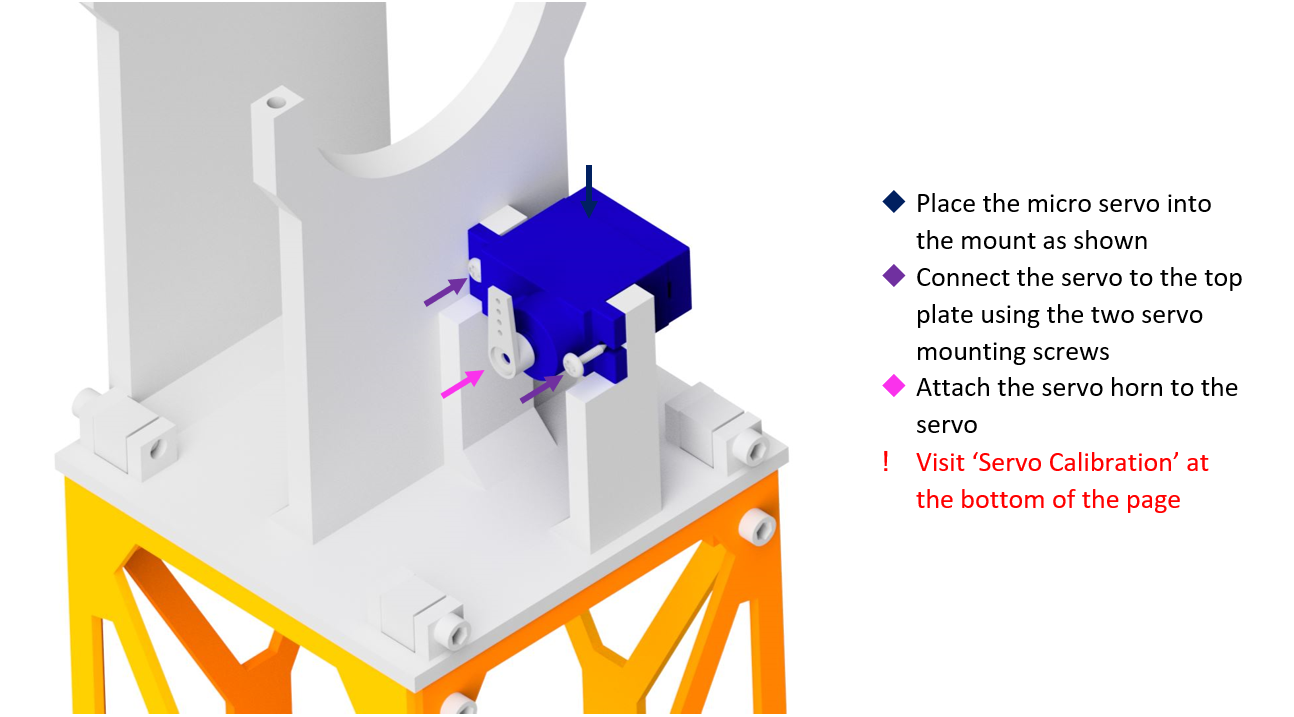
## Step 6:
![](https://images.squarespace-cdn.com/content/v1/60a43bf842d7b601064a8828/82f25a3b-1af5-4d8a-8036-a471c0a14784/Step+6.PNG)
![](https://images.squarespace-cdn.com/content/v1/60a43bf842d7b601064a8828/e1e31233-e518-44ac-9e0d-484e81e0fc6e/Spacer.png)
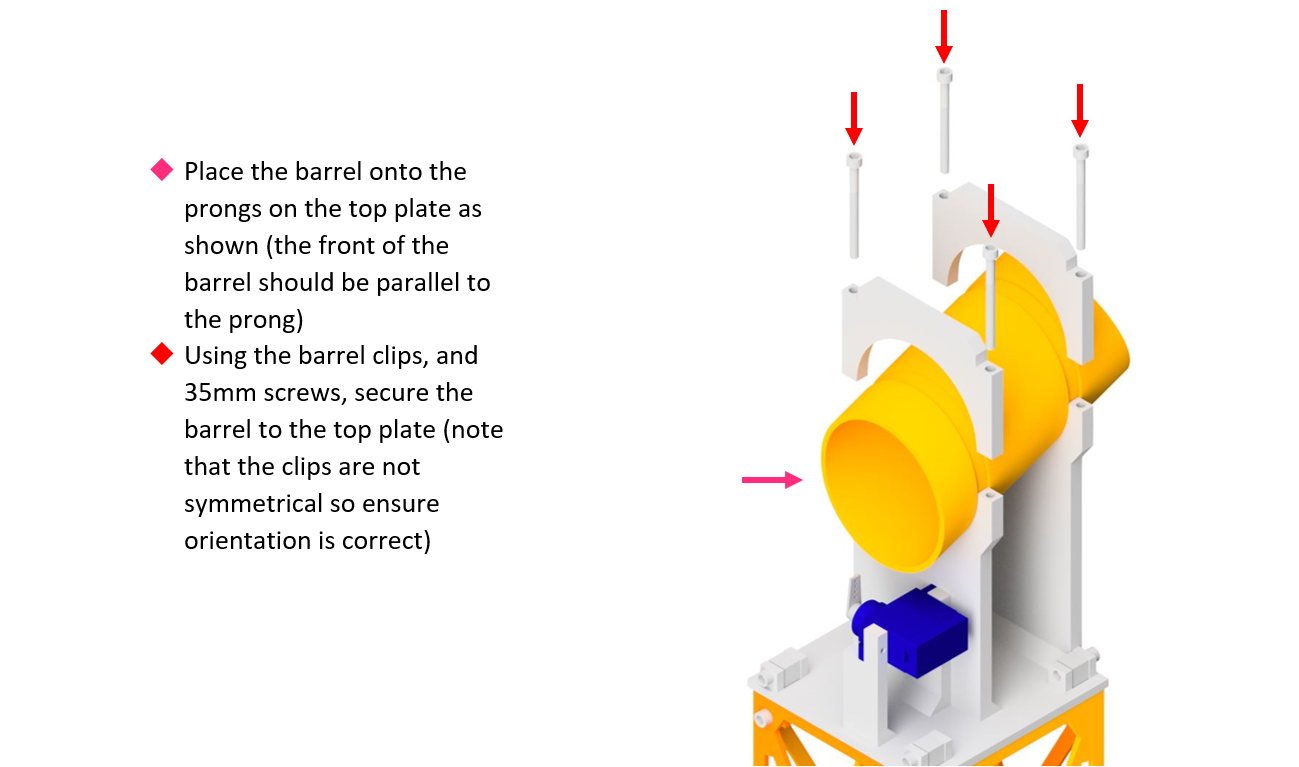
## Step 7:
![](https://images.squarespace-cdn.com/content/v1/60a43bf842d7b601064a8828/3b9942be-2cf4-40b4-a999-9c504baad90b/Step+7.PNG)
![](https://images.squarespace-cdn.com/content/v1/60a43bf842d7b601064a8828/b08d92f0-5f70-47c8-9f3f-7646fc59d3d5/Spacer.png)
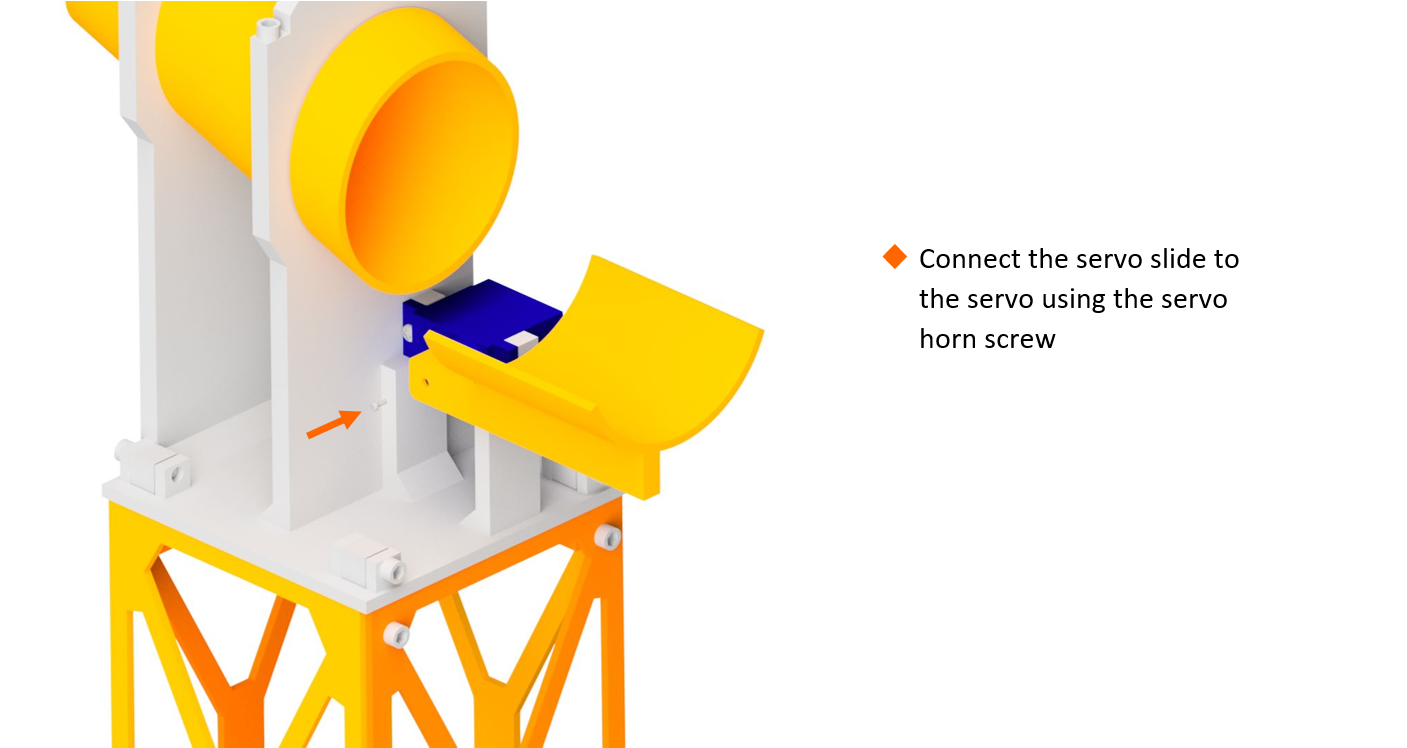
## Step 8:
![](https://images.squarespace-cdn.com/content/v1/60a43bf842d7b601064a8828/28e3e166-8922-4e76-9b27-06190427b492/Step+8.PNG)
![](https://images.squarespace-cdn.com/content/v1/60a43bf842d7b601064a8828/491f1dc9-3231-420c-993e-be3cbbba269f/Spacer.png)
## Complete:
![](https://images.squarespace-cdn.com/content/v1/60a43bf842d7b601064a8828/a66e838c-9aa3-4cfa-b84e-bca8827b2c9f/Complete.jpg)
![](https://images.squarespace-cdn.com/content/v1/60a43bf842d7b601064a8828/92d4ff8b-67fc-4cee-a7ba-06c7b6b5a100/Black+Spacer.png)
## Servo Calibration:
Before attaching a servo horn to a servo, we need to make sure that the servo moves in the correct range. This guide will help you calibrate your servos correctly.
---
#### Step 5:
![](https://images.squarespace-cdn.com/content/v1/60a43bf842d7b601064a8828/3cc8bfb2-5ac1-4148-adb9-0fb47daf5fbf/Code.PNG)
Once step 5 is completed, plug the servo into the right port and run the following code
![](https://images.squarespace-cdn.com/content/v1/60a43bf842d7b601064a8828/f3b5874f-f027-4618-acb8-f3db7a34729d/Servo+calibration.PNG)
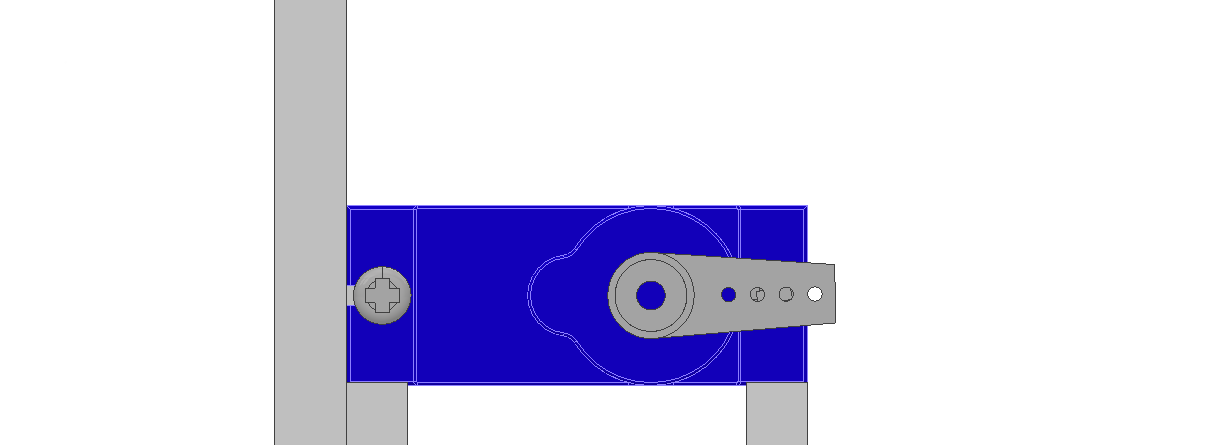
Upload the code and attach the servo horn to the servo so its in this position when the servo is at 0.
![](https://images.squarespace-cdn.com/content/v1/60a43bf842d7b601064a8828/015cf679-68e8-4e77-b571-6b23d635f73f/Black+Spacer.png)
## Whats Next?
With your fully built Micromelon RoboRAVE attachment, head on over to our guide to RoboRAVE line follow to get started!
[
Guide to RoboRAVE Line Follow
](https://micromelon.com.au/resources/guide-to-roborave-line-follow)