 707c49dd3f
Complete website build including:
- Build Your Kit store page with cart system, sectioned layout
  (Hardware, Software, Attachments, Spare Parts), inline quote
  request form, and sticky sidebar summary
- 16+ pages: Education, Platform, Resources, News, About Us,
  Download, Contact, Rover, Code Editor, Robot Simulator, etc.
- 89+ MDX resource articles and 18 news posts
- Store product images scraped from micromelon.com.au
- Quote request API route with Airtable integration
- Dynamic back links and cover photos on resource pages
- Redesigned downloads page
- Fixed corrupted MDX code blocks
111 lines
4.7 KiB
Plaintext
111 lines
4.7 KiB
Plaintext
---
|
||
title: "Activity: Line Following"
|
||
date: "2022-02-23"
|
||
categories: ["Activities", "All", "Simulator Activities"]
|
||
tags: ["Colour Sensors", "Branching", "Iteration", "Algorithm Design", "Intermediate"]
|
||
excerpt: "Learn the colour sensor and simple algorithm design while following the line."
|
||
featuredImage: "/images/resources/line-following.png"
|
||
---
|
||
|
||
[
|
||
|
||

|
||
|
||
](/robot-simulator)
|
||
|
||
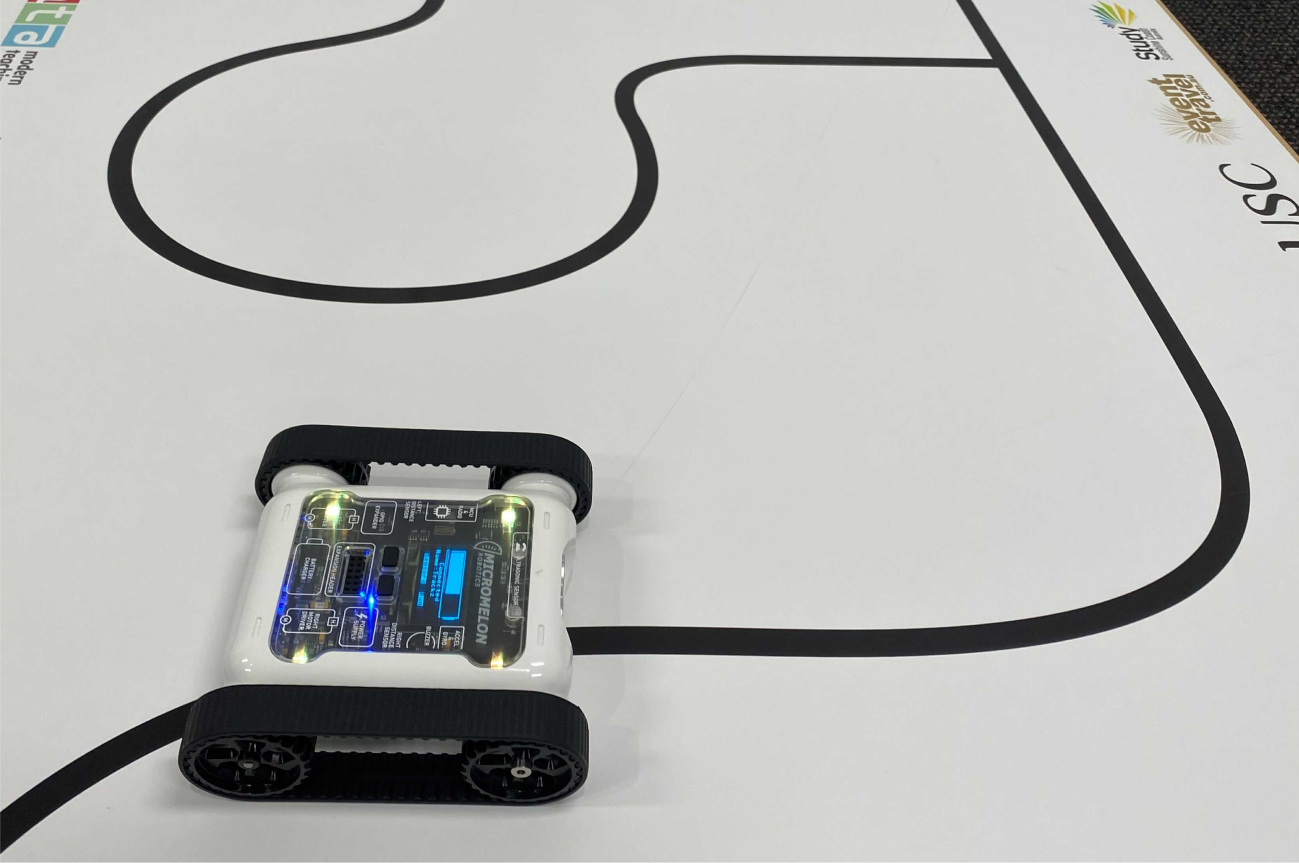
Program the rover to follow a line. Use the colour sensors on the rover to help detect where the line is and determine where the rover should move and turn to stay on the line.
|
||
|
||
|
||
|
||
Activity Demonstration
|
||
|
||
### Setup
|
||
|
||
When setting up ensure that the line to be followed has a clear contrast from the surface it is on and is thick enough for the colour sensors to detect. We recommend a thickness of 1-2cm, anything less will become difficult for the rovers. When designing a track, try and use rounded corners for turns. The sharper the turn the more difficult it will be to stay on the line. You can also incorporate additional challenges into your course. For example, have rovers detect and go around objects on the track or detect different coloured lines that indicate speed changes or turning directions at intersections.
|
||
|
||
### Here’s Our Approach
|
||
|
||
#### Stage 1
|
||
|
||
Add a while true loop and an ELSE/IF statement so that we can continuously ask our rover questions about its environment.
|
||
|
||
#### **Stage 2**
|
||
|
||
Now we need to add our brightness value that we are comparing to (in this case 210).
|
||
|
||
If you need to check the brightness value of your line, you can see the colour sensor values in the Sensor View of the Code Editor. Press the ROVER button in the top bar of the Code Editor. You can see the colour sensor values in the top right table of Sensor View.
|
||
|
||
#### **Stage 3**
|
||
|
||
Pick a brightness value between your line and the colour next to your line (e.g. if your sensor reads 130 for black, and 230 for white, something like 180 would be a good starting point). Then get the rover to drive gradually left or right using the set motor speeds block.
|
||
|
||
**Tip: **
|
||
|
||
Test with different numbers! In our example, a speed difference of 8 for the motors worked well, but numbers for your rover may vary. You could even experiment with different RGB values to see if that gives you a better result.
|
||
|
||

|
||
|
||
Example Code
|
||
|
||

|
||
|
||
Sensor View in the Code Editor
|
||
|
||
### Related Posts
|
||
|
||
Resources
|
||
|
||
[
|
||
|
||

|
||
|
||
](/resources/creating-a-sumo-unit)
|
||
|
||
[All](/resources?category=All)
|
||
|
||
[Creating A Sumo Unit For Your Digital Technologies Class](/resources/creating-a-sumo-unit)
|
||
|
||
[All](/resources?category=All)
|
||
|
||
How to run a sumo unit in your digital technologies classroom.
|
||
|
||
[Read More →](/resources/creating-a-sumo-unit)
|
||
|
||
[All](/resources?category=All)
|
||
|
||
[
|
||
|
||

|
||
|
||
](/resources/ultrasonic-sensor)
|
||
|
||
[All](/resources?category=All), [Guides](/resources?category=Guides)
|
||
|
||
[The Ultrasonic Sensor](/resources/ultrasonic-sensor)
|
||
|
||
[All](/resources?category=All), [Guides](/resources?category=Guides)
|
||
|
||
Learn all about the ultrasonic sensor!
|
||
|
||
[Read More →](/resources/ultrasonic-sensor)
|
||
|
||
[All](/resources?category=All), [Guides](/resources?category=Guides)
|
||
|
||
[
|
||
|
||

|
||
|
||
](/resources/year-7-digital-tech-at-st-peters)
|
||
|
||
[All](/resources?category=All), [Customer Stories](/resources?category=Customer+Stories)
|
||
|
||
[Case Study: Year 7 Digital Tech at St Peters Lutheran College](/resources/year-7-digital-tech-at-st-peters)
|
||
|
||
[All](/resources?category=All), [Customer Stories](/resources?category=Customer+Stories)
|
||
|
||
See how Meg Foley at St Peters conducted a challenge for their Year 7s using Micromelon.
|
||
|
||
[Read More →](/resources/year-7-digital-tech-at-st-peters)
|
||
|
||
[All](/resources?category=All), [Customer Stories](/resources?category=Customer+Stories)
|